You recognize the handwriting and the product name. The rest takes a little work. Which container did that note refer to? Was the reference from a printed handbook or a page you saved online? And did you write the observation that afternoon, or add it later?
A reloading data book earns its place when you can answer those questions months after making an entry. Alongside the details you record, it keeps the product, package, original source, and date recognizable. A page full of shorthand is much less useful once the context has faded.
That is where Range Pocket fits into the routine. Its Loading Lab keeps component records, source references, and dated session notes in one workspace. You can keep the familiarity of a paper notebook while giving the information you return to most often a home in the app.
Give each record enough context to stand on its own
Start with the details that let you identify an entry without relying on memory. The exact product name helps you find the right item. The lot identifies the batch, while a package description helps distinguish the container you recorded. A source reference explains where the published information came from. Your own dated note explains what you wanted to remember.
Those details do different jobs, so give them distinct places in your records:
- Product identity: manufacturer, product name, and catalog or part number. These distinguish the item from similar names in your library.
- Batch and package: the lot printed on the package and a recognizable package description. Keep the batch identifier and your container notes together.
- Reference source: publisher, title, edition, page or reference, and source address where available. These give you a path back to the original publication.
- Date and context: when the note was made, the relevant session date, and a brief description. These separate an earlier observation from a later addition.
- Corrections: what was corrected and when. A short explanation keeps a changed label or transcription from becoming unexplained history.
These are recordkeeping details you can carry between a notebook, spreadsheet, and app. A consistent arrangement makes an older entry easier to read, even when you have not opened that section for a while.
Keep the product and its package distinct
A product name can stay the same across several purchases. Its catalog number identifies the product; the lot printed on a container identifies the batch. Writing both under a single vague label makes a later review harder than it needs to be.
Loading Lab's propellant and primer records provide separate places for product identifiers, lot numbers, and package notes. The saved component below illustrates that distinction: the product name, manufacturer, and SKU sit alongside a separate lot and container description.
This screenshot shows a saved record, reopened in the actual Android app. The package details are illustrative examples, not a customer's inventory.
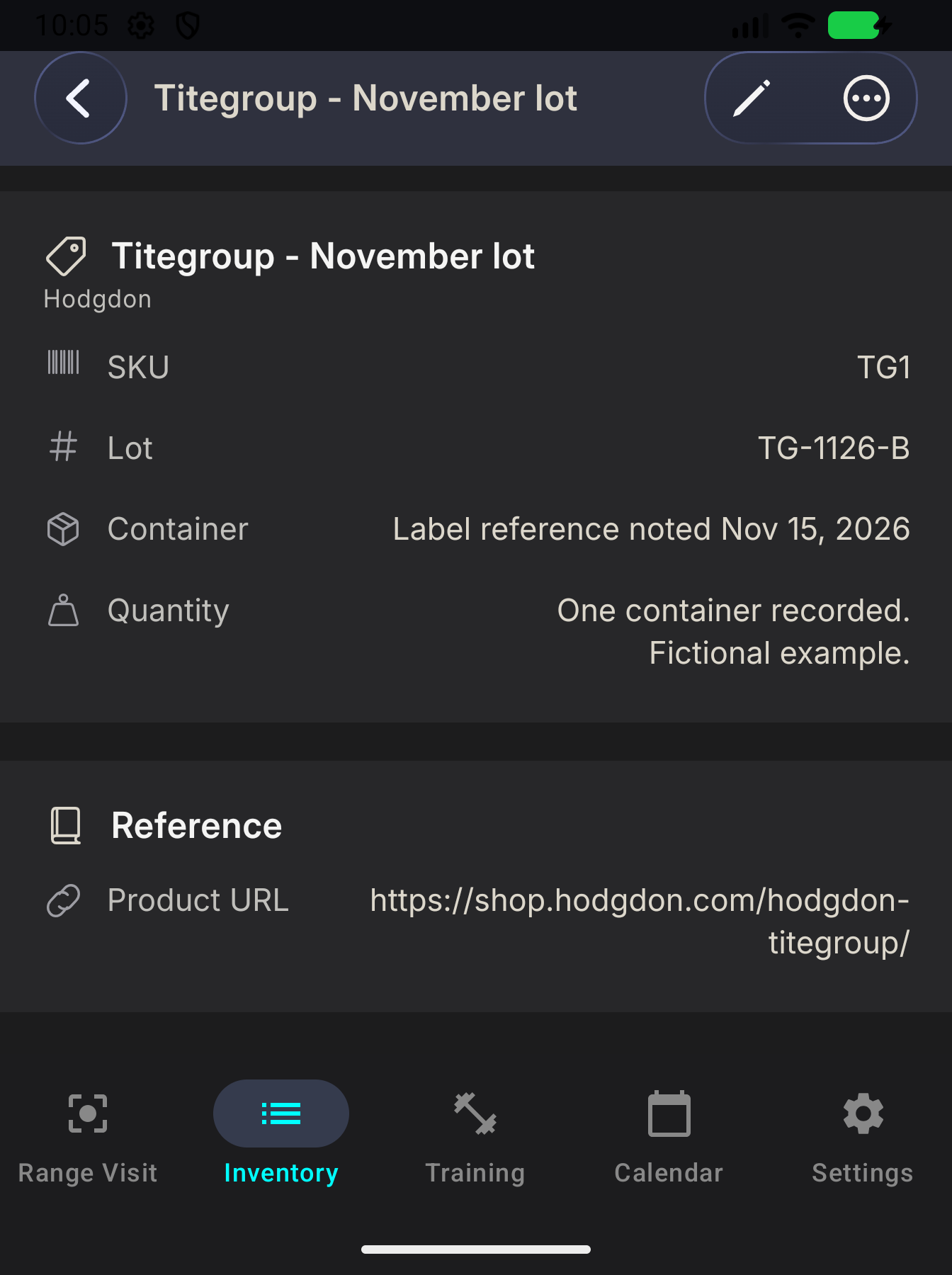
The component-record walkthrough covers entering and reopening those fields. For a different kind of relationship, the cartridge and case walkthrough shows how a saved case stays associated with its cartridge.
As package details change, keep a dated note of anything you still need from the earlier record before editing it. An editable lot field describes what you have entered now; preserving the history takes a deliberate note.
Keep a path back to the original source
A personal data book and a publisher's handbook serve different purposes. Your book holds your records and observations. A published reference has its own author, edition, and updates. For example, Hornady makes its handbook available in print, electronic, and app formats; recording the title alone may leave you wondering which version you consulted.
Retain enough publication detail to find that source again. Keep your own commentary clearly identified alongside it. Personal notes do not replace the publisher's current information.
In Loading Lab, recipe records have dedicated fields for the manual or data source, edition, page or reference, and source URL. Component records can retain a product URL, which serves a different purpose: identifying the manufacturer's product page. That separation helps you distinguish a catalog reference from the publication cited in your personal record.
Make paper and digital records easy to cross-reference
A notebook is convenient when you want to jot down a short observation. A digital library is useful when you want the product details and references together without searching through loose pages. You can use both without copying every line twice.
Choose a recognizable naming pattern and keep dates consistent. If a paper page contains additional context, include its notebook name and page number in your digital notes. On paper, use the same product or record name you will recognize in the app. The connection only needs to be clear enough that you can follow it later.
Keep original notes when you transcribe them, and mark corrections with a date. A brief explanation such as “corrected the product reference address” is more useful than silently replacing an older note and trying to remember why it changed.
Leave the record ready for your next review
Before closing an entry, read it as if someone handed it to you months from now. Can you identify the product and package? Find the original source? Tell your observation from a quotation or later correction?
Loading Lab also provides separate dated sessions for keeping the location, notes, and associated test records together. These sit within Loading Lab; ordinary range visits have their own records in Range Pocket. Keeping the date and context clear helps you return to the right part of your history.
You do not need to reorganize every old notebook at once. Start with the records you open most often, retain their source details, and give the next note enough context to last. Explore Loading Lab, or visit the Range Pocket app page for the iPhone and Android download links.