
Store make, model, caliber, source, purchase date, photos, and personal notes.
Firearm Inventory
Build and review a firearm record in Range Pocket.
Start with identifying details, add the ownership context you know, then return to the same record for notes, range history, and maintenance.
Connect each firearm to range visits, round counts, target photos, and training history.
Keep accessory changes, maintenance context, and receipts near the record they belong to.
In the app
From a new entry to a useful record
Record the identifying details
Add the make, model, caliber, and photos you need to recognize the firearm. Keep your own identifier or serial number with the record when appropriate.
Add the ownership context you know
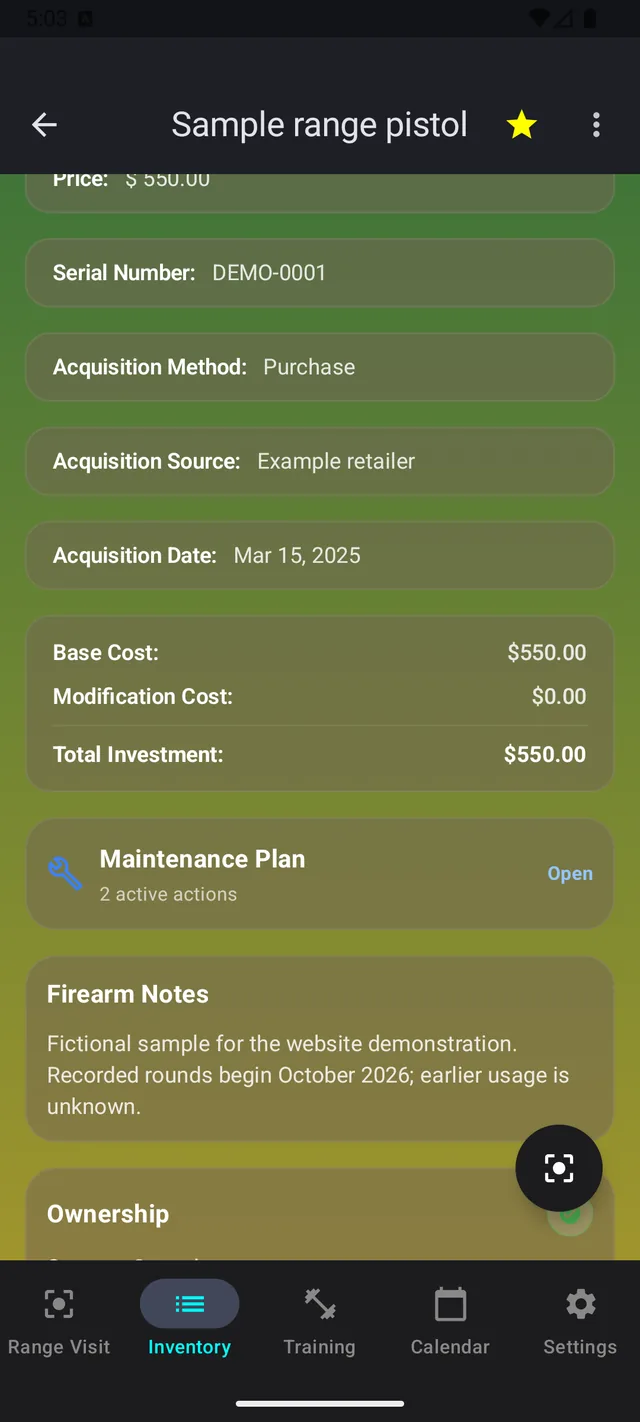
Record the acquisition method, source, and date. Review Base Cost, Modification Cost, and Total Investment together instead of mixing purchase details with later changes.
Leave a clear starting point
Use Firearm Notes to explain gaps in the history. The sample shown says recorded rounds begin in October 2026 and earlier usage is unknown, so a new log is not mistaken for a lifetime total.
Return to the connected history
Review range visits and round counts alongside the record. Open Maintenance Plan from the firearm detail when you need to review its active actions.
Common Questions
Firearm Inventory FAQ
Can I add photos to firearm records?
Yes. Range Pocket is designed to keep firearm photos and record details together so the inventory is easier to review.
Can inventory connect to range history?
Yes. Firearm records can connect to range visits and round counts, giving each firearm a more useful usage history.