
Inventory, range logs, notes, photos, and maintenance details stay organized around the items and sessions they belong to.
Range Pocket · Shooting Range Log App
A shooting range log for photos, notes, and round counts.
Range Pocket is a shooting range log app for iPhone and Android. Record each visit’s date and range, the firearms used, rounds fired, target photos, and notes. Keep those details together so you can review a session before your next visit.
Questions before downloading? Email support@armorysync.com.
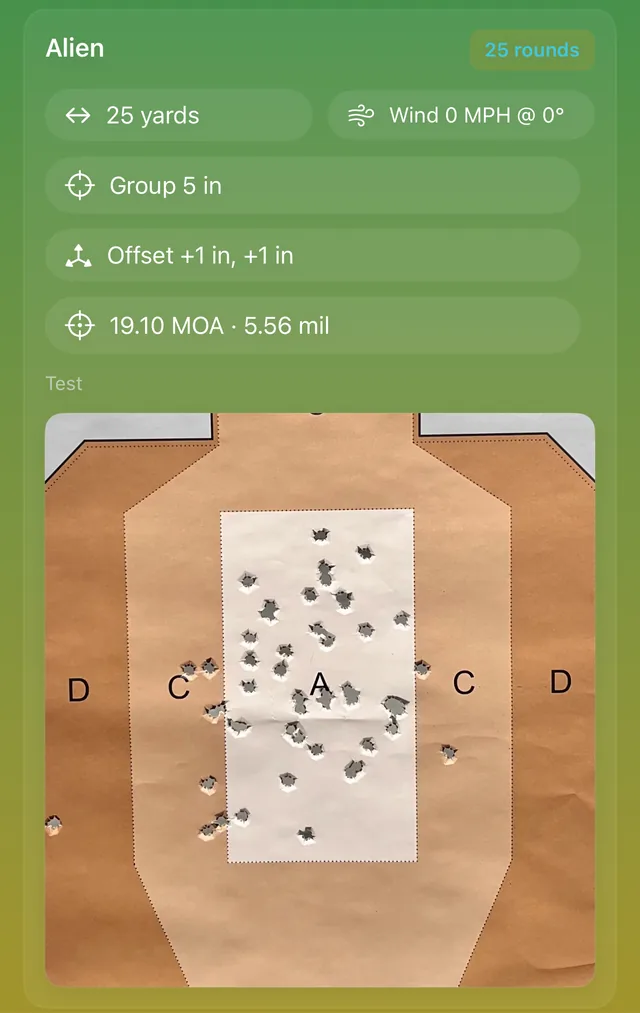
A worked example
What one useful range record looks like
This fictional example shows the details you could keep for one visit. The venue, firearm alias, and session details are invented; this is not a customer record.
- Date
- September 12, 2026
- Venue
- Example Indoor Range
- Firearm alias
- Range pistol A
- Round count
- 50 rounds for Range pistol A
- Target photo
- 1 photo attached to this entry
- Session note
- Saved the target photo and checked the session total before leaving.
If you use another firearm during the same visit, keep its count and photos with its own entry. Later, the visit tells you when and where you went, while each entry keeps the individual item’s history clear.
A simple record-and-review workflow
1. Record the visit
Start with the visit date and range. Add the firearms you used and a round count for each item, so a session total does not erase the individual records.
2. Keep the supporting context
Attach a target photo and add a short note while the details are fresh. Keep the photo with the entry it describes so you can find it again without searching a camera roll.
3. Review before the next visit
Open the earlier session and review its firearm entries, round counts, photos, and notes together. Then record the next visit separately to keep a clear history over time.
Keep a PDF copy of a range visit
Range Pocket can export a range-visit report as a PDF on iPhone and Android. Review the recorded details before choosing where to save or share a copy. See the saved visit and PDF report walkthrough for an Android example.
Built for real records
Built for firearm owners who want useful records without a heavy workflow.
Read the FAQAdd enough structure to be useful later without turning ownership or range days into admin work.
Firearms, accessories, round counts, photos, and visits stay connected so history is easier to understand.
Product questions and setup feedback have a direct support email instead of leaving owners guessing.
Common Questions
Shooting Range Log App FAQ
What should I record in a shooting range log?
Start with the date, range, firearms used, and rounds fired for each firearm. Add target photos and a short note while you remember the visit. These details give you a useful record to review later.
Can I keep separate round counts for each firearm?
Yes. Range Pocket connects range logs to the firearms used, so you can keep each firearm’s round count with its session details instead of relying on a single total for the visit.
Can I save target photos with my range log?
Yes. Target photos and notes can stay with a range log, alongside the firearm and round count. You can revisit that context together rather than trying to match a camera-roll photo to an old session.
Is Range Pocket available for iPhone and Android?
Yes. Range Pocket is available on the App Store and Google Play. Check the store listing for your device’s current compatibility and availability.
How do I use earlier range logs before another visit?
Review the previous visit’s date, firearm entries, round counts, photos, and notes. Use that record to recall what you brought and what you documented, then add a new visit so the history stays organized by session.
Range Pocket for iPhone and Android
Start your next range log.
Download Range Pocket to keep visit notes, round counts, and target photos together on your phone.
Questions before downloading? Contact product support.