
Inventory, range logs, notes, photos, and maintenance details stay organized around the items and sessions they belong to.
Range Pocket · Firearm Inventory App
Your firearm inventory and personal log, together.
Keep each firearm's details, photos and recorded history together. Range Pocket for iPhone and Android connects your inventory with range visits and maintenance records, so you can return to the information you have entered for each item.
Available for iPhone and Android. Compare platforms and record storage.
What belongs in a personal firearm log?
An inventory identifies the items you record. A personal log adds the history you enter over time. Start with known details and leave gaps visible rather than guessing.
- Identification
- A recognizable name, make, model and caliber, with the identifying details you choose to keep in your private record.
- Acquisition
- The date, source and purchase amount, when known. Keep later costs or estimates distinct from the amount paid.
- Photos and notes
- Images that help identify the item, configuration notes, and references to supporting documents kept elsewhere.
- Recorded use
- Linked range visits and the rounds you recorded. Note when your log begins so missing earlier history stays clear.
- Maintenance history
- Dated entries associated with the relevant firearm, with notes and service costs you can review later.
A worked example
One item, with enough context to find it again
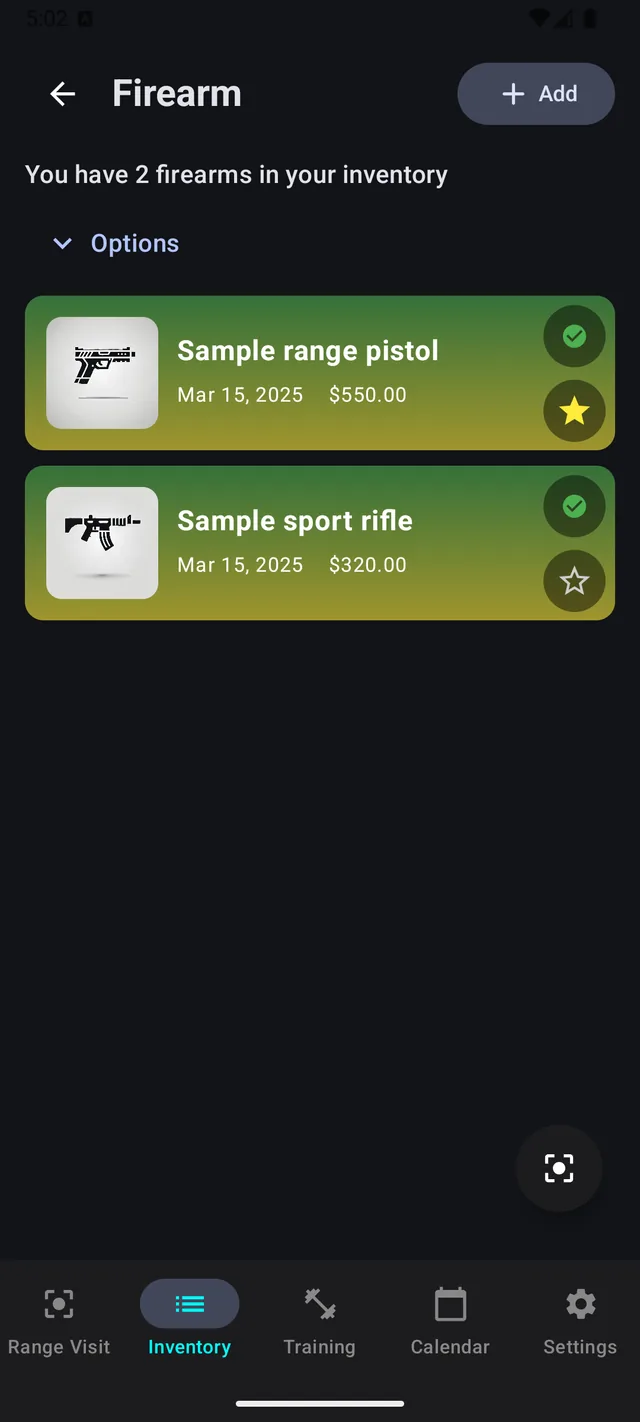
This fictional record illustrates how an inventory entry can grow beyond a row in a spreadsheet. It is a demonstration, not a customer's collection.
- Name
- Sample range pistol
- Make, model, caliber
- Ruger · Mark IV · .22 LR
- Acquisition
- March 15, 2025 · Example retailer · $550
- Recorded usage
- 125 rounds across two sample range visits
- Record limitation
- Earlier usage is unknown. Recorded rounds are not a lifetime total.
- Supporting context
- Notes and maintenance entries stay associated with this firearm.
Start with what you know. An unknown purchase date or incomplete usage history is more useful when labelled honestly than when filled with a guess. Add photos and supporting notes as you find them.
From a loose list to a useful inventory
1. Create an identifiable entry
Give each item a recognizable name, then add make, model, caliber, and the acquisition details you know. Keep personal identifiers out of screenshots or reports you intend to share.
2. Keep the context with the item
Add the photos and notes that help you recognize the item and its recorded configuration. Review the entry when your equipment or records change.
3. Connect recorded use
Choose the firearm when recording a range visit. Its recorded round count then has a dated session behind it, and related maintenance can be reviewed in the same app.
Built for real records
Built for firearm owners who want useful records without a heavy workflow.
Read the FAQAdd enough structure to be useful later without turning ownership or range days into admin work.
Firearms, accessories, round counts, photos, and visits stay connected so history is easier to understand.
Product questions and setup feedback have a direct support email instead of leaving owners guessing.
Questions about these records
How is this different from a firearm inventory spreadsheet?
A spreadsheet is flexible, but photos, range visits, and maintenance notes often end up in separate files. Range Pocket organizes these records around the firearm. You still enter and maintain the information; the app does not verify ownership or recover missing history.
Can I use Range Pocket on iPhone and Android?
Yes. Range Pocket is available on the App Store and Google Play. These screenshots show the Android app; layouts and some features vary by platform. Check the product's platform comparison and your edition's plan screen for current allowances.
Where are my personal inventory records stored?
Personal firearm, ammunition, range-visit, and training records are stored on your device. Exporting, sharing, transferring, or submitting information to a connected feature can create a copy elsewhere. Shared competition data uses online services; device backups depend on your operating-system settings.
What should I know before transferring my records to another device?
Receiving a transfer replaces local records and photos on the receiving device. It does not merge two libraries or keep them continuously synchronized. The sending device stays unchanged; sign-in and subscription status are not copied. Apple-to-Android personal-record transfer is not supported by these transfer tools.
Are these real customer records?
No. The Android app screen uses fictional sample records created for this demonstration. Names, identifiers, purchase details, and visit history are examples.
Range Pocket for iPhone and Android
Start with one firearm record.
Download Range Pocket and keep the details, photos, and recorded history you know together with each item.
Questions before downloading? Contact product support.