
Track cleaning notes, maintenance history, photos, and configuration changes.
Firearm Maintenance
Review a firearm’s maintenance plan and record follow-up.
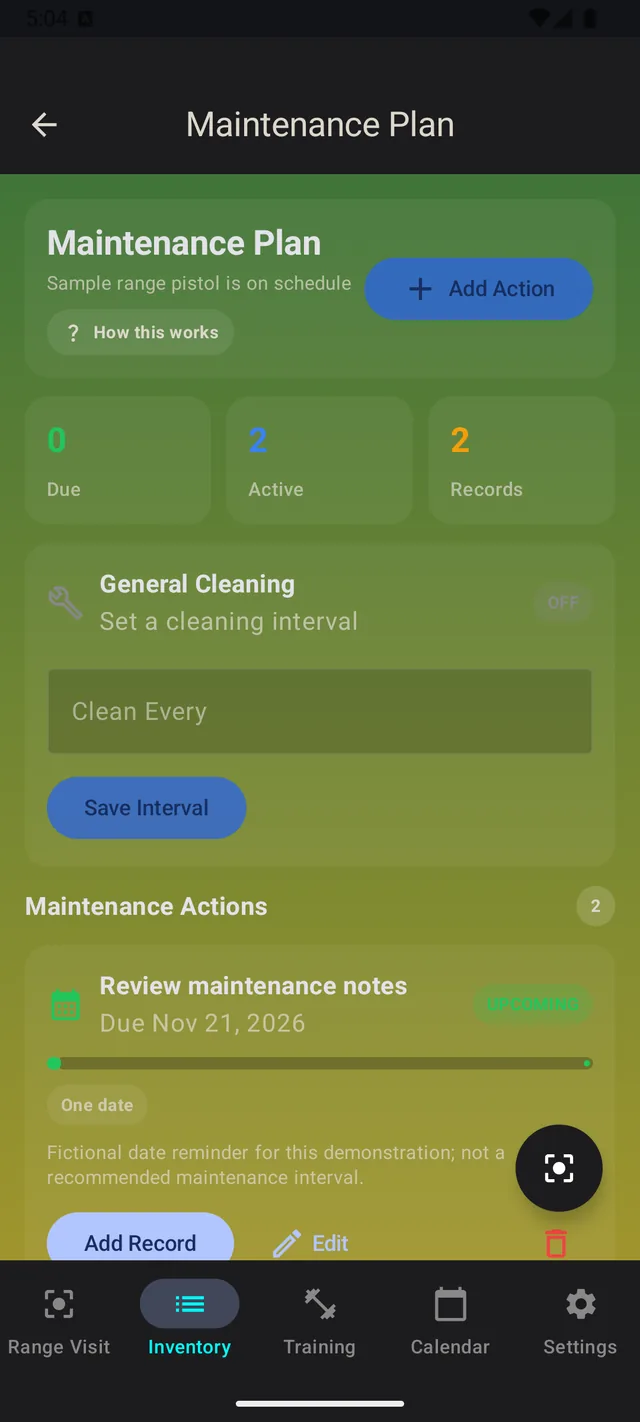
Open the plan from a firearm record, review active actions and due dates, and keep completed work in that firearm’s maintenance history.
Use round counts and range history as context for follow-up maintenance.
Set reminders for accessories and battery-powered equipment before the next session.
In the app
From a reminder to a dated record
Open the firearm’s plan
Select Maintenance Plan from the firearm detail. The plan’s Due, Active, and Records counts help you distinguish work to review from records already saved.
Review or add an action
Use Add Action for a follow-up item, or Edit on an existing action to review its details. The sample’s Review maintenance notes action is a one-date reminder.
Record what happened
Use Add Record on the relevant action to keep the completed work with the firearm’s history. A dated record gives your next review something concrete to refer to.
Use your own service guidance
The General Cleaning control can store an interval, but the sample leaves it off. Choose maintenance requirements from the equipment manufacturer’s guidance; the app organizes the reminders and records you enter.
Common Questions
Firearm Maintenance FAQ
Can maintenance records be tied to a firearm?
Yes. Range Pocket keeps maintenance context organized around the firearm it belongs to.
Can I track accessory battery changes?
Yes. Range Pocket includes accessory tracking and battery reminder workflows.